
Belenios 3.3.0 on AWS User Guide
Overview
This guide covers launching and using the Belenios 3.3.0 on Ubuntu 24.04 AMI from cloudimg on Amazon EC2. It is one version of the cloudimg documents, forms and scheduling listing on AWS Marketplace; you pick it as the software version when you subscribe and launch.
Belenios is an open source verifiable online voting system developed at INRIA (the French national research institute for digital science). Voters cast encrypted ballots from their browser, every voter can check that their ballot is on the public bulletin board, and anyone can verify the final tally against that board, so the result does not depend on trusting the server. The roles are separated: administrators set up elections, a credential authority hands out voting credentials, and trustees hold the decryption keys.
Upstream Belenios is a server you build from source, configure by hand and put behind your own web server. The cloudimg image does that work and adds:
- HTTPS from the first boot. nginx serves Belenios on port 443 with a certificate generated on your instance's first boot. Port 80 redirects to HTTPS, and requests for host names the instance does not serve are dropped.
- One administrator, a password unique to your instance. Restricted mode is on: there is no self sign-up and no demo account. First boot creates the administrator
adminwith a random password, proves the login works, and only then opens HTTPS. The password file can only be written by the server's own account. - Built from source, locked down. The server is built from the Belenios 3.3.0 source with upstream's own release build in upstream's pinned build image, then runs as a container with a read-only filesystem, no Linux capabilities and no new privileges, published on
127.0.0.1:8001only. - Fail closed. The server refuses to start (and systemd does not retry it) if the administrator password file is missing, empty, malformed, unreadable or a link.
- No mail leaves until you say so. Election e-mails (voter credentials, notifications) are kept in a local outbox on the instance until you configure your own SMTP relay.
- Metadata blocked. The container and the Belenios services cannot reach the EC2 instance metadata service; the instance requires IMDSv2.
- Patched. The image is fully patched Ubuntu 24.04 LTS with unattended security upgrades on, and the server image passed a CVE scan at build time.
What is on the image: Belenios 3.3.0 (belenios-server and belenios-tool in the container image cloudimg/belenios:3.3.0), nginx, Docker Engine, Ubuntu 24.04 LTS, cloud-init and the AWS Systems Manager agent. The licence and the build notes are in /usr/share/doc/belenios/.
Default user: ubuntu · Architecture: x86_64 · Recommended instance type: m5.large
Prerequisites
- An AWS account subscribed to the listing, an EC2 key pair and a VPC subnet with a route to the internet (or a private route you use for management).
- A security group that allows TCP 22 (SSH), TCP 443 (Belenios) and TCP 80 (redirects to HTTPS). Open 22 from your own networks only; open 443 and 80 to your administrators and voters.
Step 1: Launch the instance
In the AWS Marketplace listing choose Continue to Subscribe, then Continue to Configuration, pick Belenios 3.3.0 on Ubuntu 24.04 as the software version and your Region, then Launch through EC2. Choose m5.large (or larger for big electorates), your key pair and a security group as above.
With the AWS CLI (replace the values in angle brackets):
aws ec2 run-instances --region <region> --image-id <ami-id-from-the-listing> \
  --instance-type m5.large --key-name <your-key-pair> \
  --security-group-ids <your-security-group> --subnet-id <your-subnet> \
  --metadata-options HttpTokens=required,HttpEndpoint=enabled \
  --tag-specifications 'ResourceType=instance,Tags=[{Key=Name,Value=belenios}]'
First boot takes about a minute: it generates the certificate and the administrator password, starts Belenios and checks the login before nginx opens port 443.
Step 2: Connect to your instance
| Version | SSH user |
|---|---|
| Belenios 3.3.0 on Ubuntu 24.04 | ubuntu |
ssh -i <your-key.pem> ubuntu@<public-ip>
The message of the day shows your Belenios address and the commands you need.
Step 3: Check the services
Everything runs from systemd: Docker, the one-time first boot unit, the Belenios container and nginx.
systemctl is-active docker belenios-firstboot belenios nginx
sudo ss -Htln | awk '{print $4}' | sort -u
sudo docker ps --format 'table {{.Image}}\t{{.Status}}\t{{.Ports}}'
active
active
active
active
0.0.0.0:22
0.0.0.0:443
0.0.0.0:80
127.0.0.1:8001
127.0.0.53%lo:53
127.0.0.54:53
[::]:22
[::]:443
[::]:80
IMAGE                     STATUS          PORTS
cloudimg/belenios:3.3.0   Up 36 seconds   127.0.0.1:8001->8001/tcp
Belenios itself listens only on 127.0.0.1:8001; nginx is the only thing on 80 and 443.
Step 4: Get your address and administrator password
First boot writes everything you need to a file only root can read. This shows it without the password line:
sudo grep -v '^belenios.admin.pass=' /root/belenios-credentials.txt
# Belenios 3.3.0 - generated on this instance's first boot by belenios-firstboot.service
# The password below is unique to this instance. Keep this file secret (0600 root).
#
# Open the URL below (self-signed certificate made on first boot), choose "Administer elections",
# log in with the local account below, and create your first election.
belenios.url=https://ec2-203-0-113-25.compute-1.amazonaws.com/
belenios.admin.user=admin
#
# Change this password (written back here):  sudo belenios-admin-password
# Add another administrator account:         sudo belenios-admin-password --user <name>
# Serve under your own DNS name (new certificate + Belenios public URL):  sudo belenios-set-hostname <name>
# Election e-mails: kept in /var/lib/belenios/mail/outbox until you configure an SMTP relay (see the guide).
# Elections and accounts: /var/lib/belenios. Licence and source: /usr/share/doc/belenios/ and https://ec2-203-0-113-25.compute-1.amazonaws.com/belenios.tar.gz
# User guide: https://www.cloudimg.co.uk/guides/belenios-3-3-0-on-ubuntu-24-04-aws/
To read the password itself, run this on the instance:
sudo grep '^belenios.admin.pass=' /root/belenios-credentials.txt
Step 5: Log in
Open the belenios.url address in your browser. The certificate is generated on your instance, so the browser warns until you install a certificate it trusts (Step 9). The home page is the local login: enter admin and the password from Step 4.
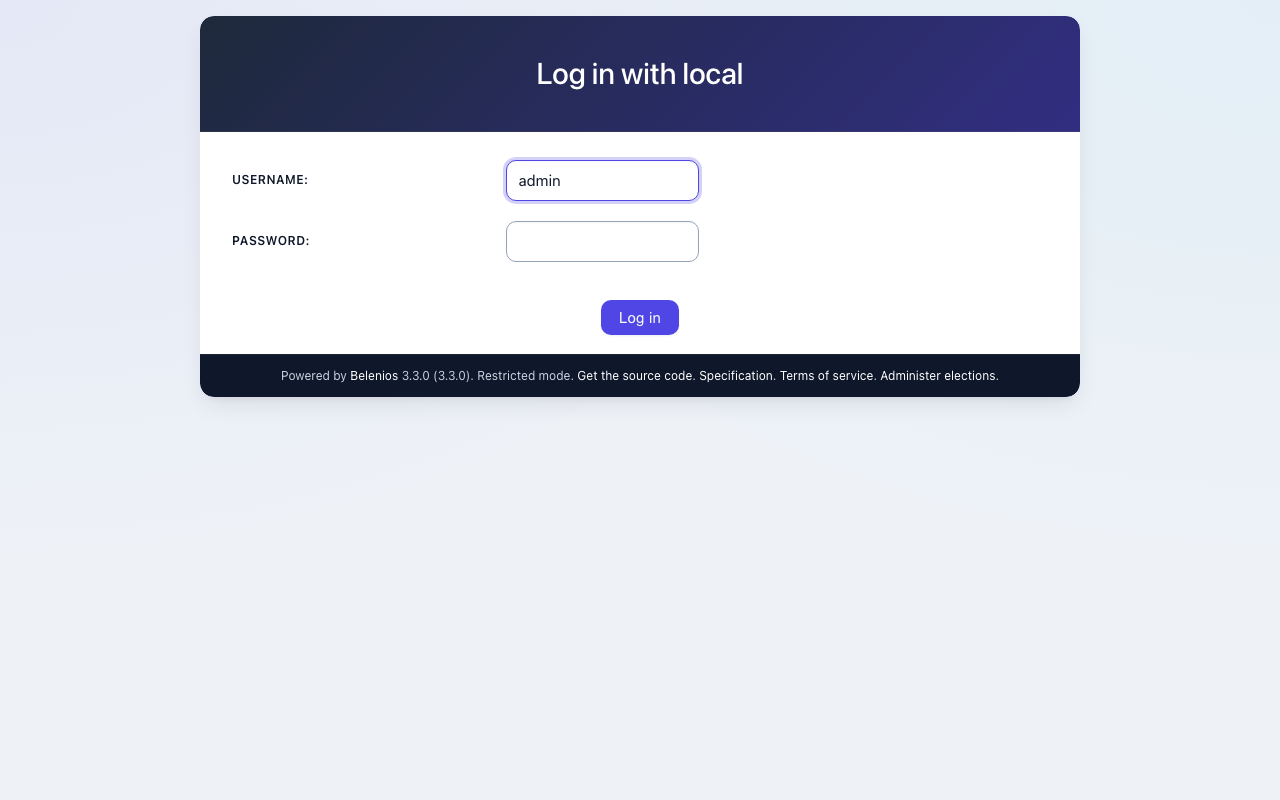
The first time you log in, Belenios asks you to accept the terms of service and then to give the account an e-mail address. It e-mails a confirmation code to that address. Until you configure an SMTP relay (Step 8) the message stays in the outbox on the instance, so read the code there:
sudo grep -A2 'please use the following code' /var/lib/belenios/mail/outbox | tail -n 1
Enter the code (it is valid for 15 minutes). Belenios confirms the address and returns you to the login page; log in again and you reach the administration page, where your elections are listed. Later logins go straight there.
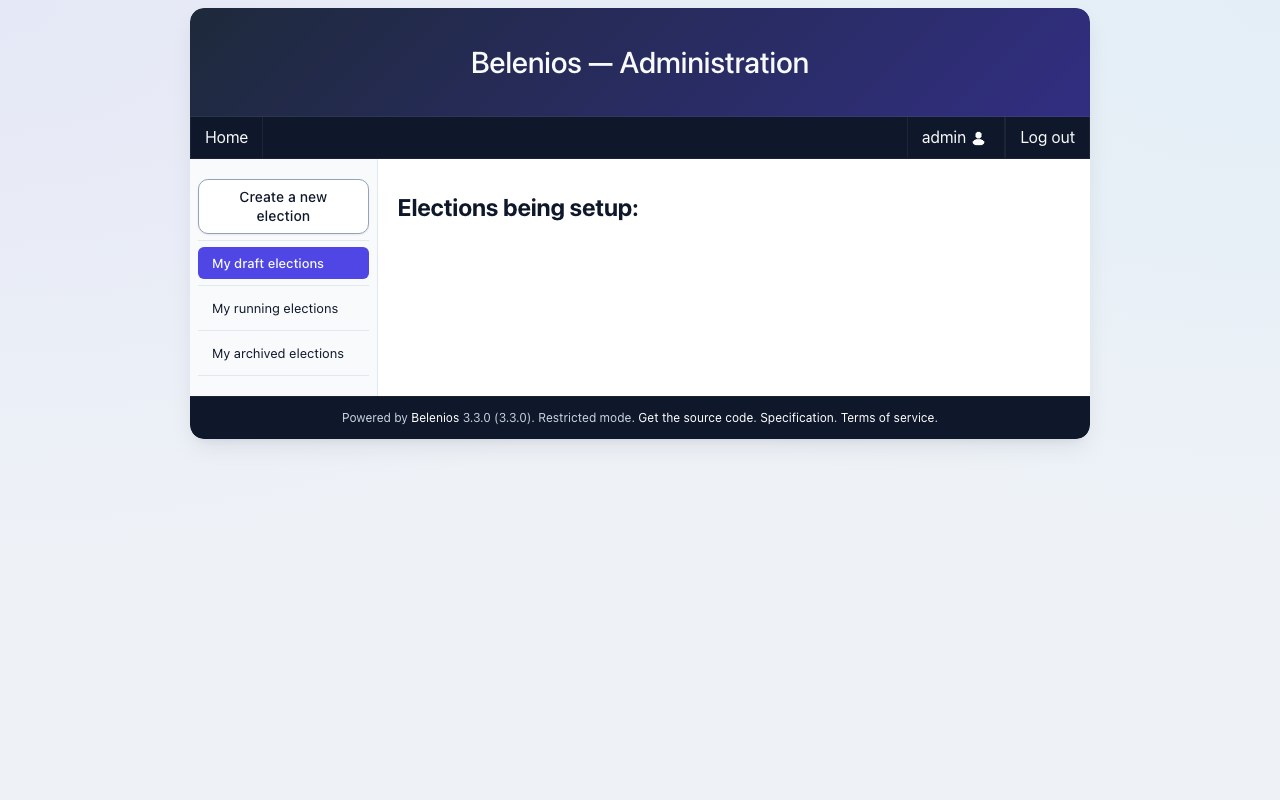
Step 6: Create an election
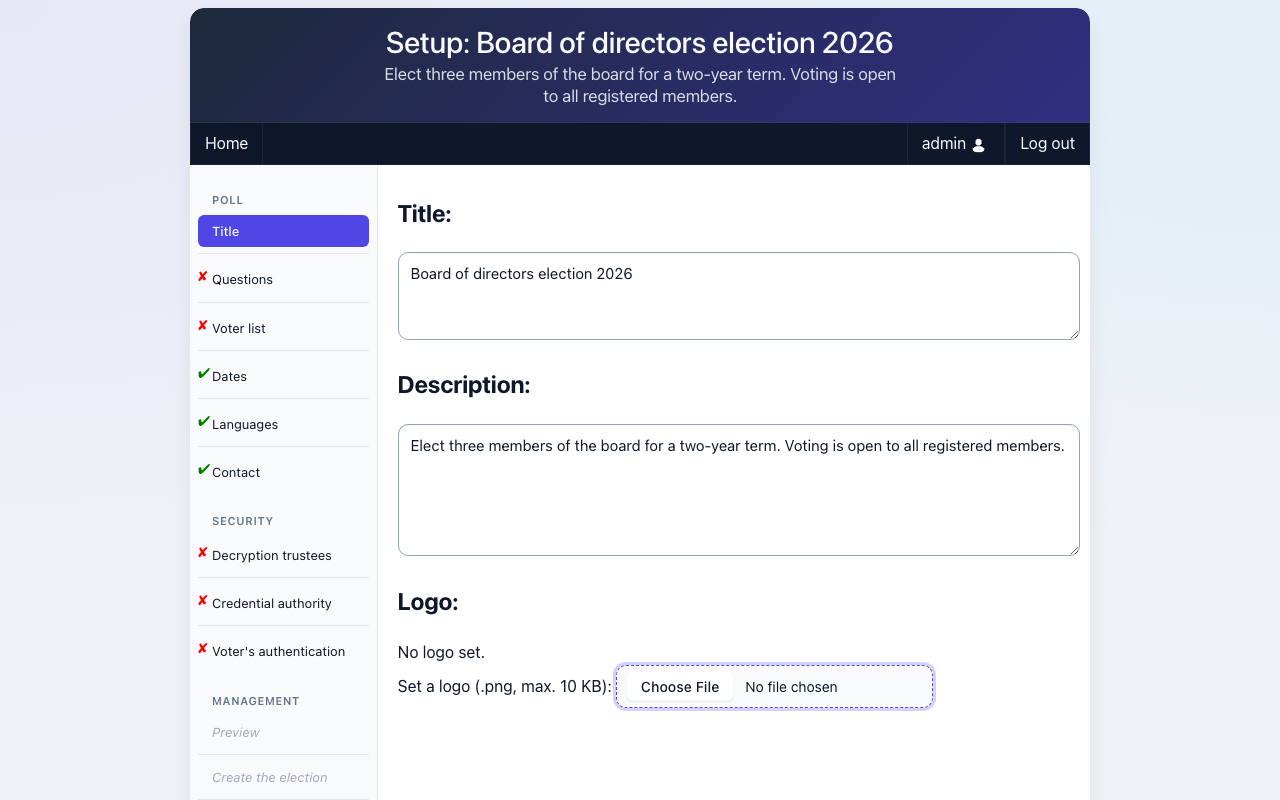
Choose Create a new election and work through the setup: the name and description, the questions and their answers, the voters (by e-mail address), the credential authority (who generates and sends the voting credentials) and the trustees (who hold the decryption keys). When everything is ready, open the election. Each election has its own page with a cryptographic fingerprint and a link to its audit data, which anyone can use to verify the result.
Voters open the election link and vote in the booth: they enter their credential, answer the questions, and their ballot is encrypted in the browser before it is sent.
Step 7: Check the security posture from the command line
These read-only checks show HTTPS, the redirect, the dropped unknown host names, the locked down container and the metadata block:
H=$(sudo sed -n 's/^set \$app_host "\(.*\)";$/\1/p' /etc/nginx/belenios-host.conf)
curl -sk -o /dev/null -w 'https %{http_code}\n' --resolve "$H:443:127.0.0.1" "https://$H/"
curl -s -o /dev/null -w 'http %{http_code}\n' --resolve "$H:80:127.0.0.1" "http://$H/"
curl -sk -o /dev/null -w 'unknown host %{http_code}\n' --resolve "other.example:443:127.0.0.1" https://other.example/ || true
sudo docker inspect --format 'user={{.Config.User}} readonly={{.HostConfig.ReadonlyRootfs}} capdrop={{.HostConfig.CapDrop}} options={{.HostConfig.SecurityOpt}}' belenios
sudo iptables -S DOCKER-USER | grep -E '169.254.169.254|br-belenios'
curl -s -o /dev/null -w 'IMDSv1 %{http_code}\n' http://169.254.169.254/latest/meta-data/ || true
https 200
http 301
unknown host 000
user=10101:10101 readonly=true capdrop=[ALL] options=[no-new-privileges]
-A DOCKER-USER ! -i br-belenios -o br-belenios -m conntrack --ctstate NEW -j DROP
-A DOCKER-USER -d 169.254.169.254/32 -j DROP
IMDSv1 401
000 means nginx closed the connection without answering (a request for a name the instance does not serve). 401 means the instance metadata service requires IMDSv2 tokens.
Step 8: Election e-mails
Belenios e-mails voters their credentials and notifications. Until you configure a relay, every message is appended to an outbox file on the instance and nothing leaves the instance:
sudo docker exec belenios printenv BELENIOS_SENDMAIL
sudo test -e /etc/belenios/smtp/msmtprc && echo "SMTP relay configured" || echo "no SMTP relay: e-mails stay in /var/lib/belenios/mail/outbox"
/usr/local/bin/belenios-sendmail
no SMTP relay: e-mails stay in /var/lib/belenios/mail/outbox
To send for real, put an msmtp configuration for your SMTP relay at /etc/belenios/smtp/msmtprc and restart Belenios. The directory belongs to the server's account (uid 10101), so write the file as that account, mode 0600. For example, for a relay that accepts authenticated submission on port 587:
sudo setpriv --reuid=10101 --regid=10101 --clear-groups sh -c 'umask 077; cat > /etc/belenios/smtp/msmtprc' <<'EOF'
account default
host smtp.your-domain.example
port 587
tls on
tls_starttls on
auth on
user belenios@your-domain.example
password <your-smtp-password>
from belenios@your-domain.example
EOF
sudo install -d -m 0755 /etc/cloudimg
echo belenios@your-domain.example | sudo tee /etc/cloudimg/belenios-mail-from
sudo systemctl restart belenios
Messages already in the outbox are not re-sent; read them with sudo less /var/lib/belenios/mail/outbox.
Step 9: Your own DNS name and certificate
Election URLs are part of each election's data, so set the name you want to keep before you create real elections. Point a DNS record at the instance, then:
sudo belenios-set-hostname vote.your-domain.example
This writes a new certificate for that name, renders the Belenios public URL and restarts the services. To use a certificate your browsers trust, replace /etc/ssl/belenios/belenios.crt and /etc/ssl/belenios/belenios.key with your own (or one from your certificate authority) and run sudo systemctl reload nginx.
To publish your own terms of service, write their URL to /etc/cloudimg/belenios-tos-uri and restart Belenios:
sudo install -d -m 0755 /etc/cloudimg
echo https://your-domain.example/voting-terms | sudo tee /etc/cloudimg/belenios-tos-uri
sudo systemctl restart belenios
Step 10: Administrator accounts and passwords
sudo belenios-admin-password                  # new random password for admin (written to /root/belenios-credentials.txt)
sudo belenios-admin-password --user alice     # add or reset another administrator (password in /root/belenios-user-alice.txt)
Neither command prints the password. Belenios restarts so the change takes effect at once.
Step 11: Data, backups and server components
Elections, accounts, the administrator password file and the mail outbox are all under /var/lib/belenios, owned by the server's account (uid 10101, shown as belenios):
sudo ls -la /var/lib/belenios
ls /usr/share/doc/belenios
sudo docker images cloudimg/belenios
total 20
drwx------  8 belenios belenios   200 Nov  9 11:55 .
drwxr-xr-x 51 root     root      4096 Nov  9 10:04 ..
drwx------  2 belenios belenios   100 Nov  9 11:58 accounts
drwx------  2 belenios belenios    60 Nov  9 11:58 lib
drwx------  2 belenios belenios   100 Nov  9 11:52 log
drwx------  2 belenios belenios    40 Nov  9 11:56 mail
-rw-------  1 belenios belenios 12288 Nov  9 11:52 ocsidb
-rw-------  1 belenios belenios    95 Nov  9 11:55 password_db.csv
drwx------  2 belenios belenios    60 Nov  9 11:58 spool
drwx------  2 belenios belenios    40 Nov  9 11:52 upload
COPYING
NOTICE-cloudimg.txt
THIRD-PARTY.txt
npm-packages-booth.txt
opam-licences.txt
opam-packages-build.txt
trivy-belenios-image.json
trivy-booth-npm.json
IMAGE                     ID             DISK USAGE   CONTENT SIZE   EXTRA
cloudimg/belenios:3.3.0   5508263abfbe        179MB             0B   U
opam-packages-build.txt lists the build environment, THIRD-PARTY.txt the libraries linked into the server and their licences, and the trivy-*.json files the CVE scans run at build time.
Snapshot the instance's EBS volume to back up your elections, or copy /var/lib/belenios to other storage on a schedule (stop Belenios first for a consistent copy: sudo systemctl stop belenios, copy, sudo systemctl start belenios). The election data holds the cryptographic material of every election; keep backups private.
Step 12: Security recommendations
- Allow port 22 in the security group from your own networks only, and ports 443 and 80 only to your administrators and voters.
- Set your DNS name and a trusted certificate before the first real election (Step 9).
- Give administrator accounts only to the people who run elections, and rotate passwords that may have leaked (Step 10).
- Configure an SMTP relay you control before you send voter credentials (Step 8).
- Keep the operating system patched; unattended security upgrades are on, and
sudo apt-get update && sudo apt-get upgradeapplies everything else.
Support and licensing
Belenios is free software under the GNU Affero General Public License, version 3 or later, with an exception for linking with OpenSSL. The running server offers its complete corresponding source for download at https://<your-host>/belenios.tar.gz (linked from every page). The licence, the build notes and the third-party notices are in /usr/share/doc/belenios/. There is no per voter or per election fee. cloudimg is not affiliated with or endorsed by INRIA or the Belenios project; the AMI price covers cloudimg's build, hardening, first boot setup and support.
- Email: support@cloudimg.co.uk
- Website: https://www.cloudimg.co.uk
- Support: 24/7, with a 24 hour response SLA