
DOMjudge 9.0.1 on AWS User Guide
Overview
This guide covers launching and using DOMjudge 9.0.1 on Ubuntu 24.04 from cloudimg on Amazon EC2. It is one version of the cloudimg Hardened Moodle & E-Learning Platforms AMIs listing on AWS Marketplace; you pick it as the software version when you subscribe and launch. The other learning platforms in the listing are described on the listing's guide hub.
DOMjudge is the automated jury system used to run programming contests such as the ICPC regionals and World Finals, and many university and school competitions and programming courses. Teams submit solutions through the web interface or the REST API; a judgehost compiles and runs each one against the problem's test data in a sandbox and returns a verdict; the jury watches progress, answers clarifications and publishes the scoreboard. DOMjudge is licensed under the GNU General Public License version 2 or later.
The image is an all-in-one appliance: the domserver (jury and team web interfaces, public scoreboard, REST API) and one judgehost run on the same instance, and a demo contest with three problems is loaded so you can see a submission judged within minutes of launch.
What is on the image:
- DOMjudge 9.0.1, built from the official release tarball (checksum verified) into
/opt/domjudge - nginx and PHP 8.3-FPM serving the domserver at the site root and the REST API at
/api; MariaDB 10.11 for the database - One judgehost (
domjudge-judgedaemon@0) with its judging chroot at/chroot/domjudge(GCC, G++, OpenJDK and PyPy 3) - HTTPS from first boot: nginx serves the site on port 443 with a certificate created on your instance's first boot, and port 80 redirects to HTTPS
domjudge-firstboot.service, which creates your instance's database, admin password, judgehost credential, demo team password and application secretdomjudge-set-hostname, which moves the site to your own DNS name
Default user: ubuntu · Architecture: x86_64 · Root volume: 12 GiB gp3
Security posture
- No database or password ships in the image. The MariaDB data directory in the image is empty. On your instance's first boot it is initialised (the MariaDB
rootaccount authenticates over the local socket only and has no password), then DOMjudge's own generators create the database password, the judgehost REST credential, the application secret and the admin password, and the database, demo contest and accounts are created with them. The demo team's stock password (demo) is replaced with a random one. No two instances share any of these values. - Fails closed. nginx and the judgehost start only after first boot has finished. If first boot cannot finish, the site stays down rather than open.
- Only nginx faces the network. The listening set is exactly 22, 80 and 443. MariaDB listens on
127.0.0.1only, and the judgehost reaches the REST API over a loopback-only listener. - The site address comes from configuration, never from the request. First boot reads it from
/etc/cloudimg/domjudge-hostname, or from the instance's addresses recorded by cloud-init at launch. nginx answers only that name (and the instance's own IP addresses), drops any other Host, and passes DOMjudge the configured name. - Real client addresses. nginx removes
X-Forwarded-For,X-Real-IPandForwardedheaders before they reach DOMjudge, so a forged header cannot change the address DOMjudge records or uses for IP-based login. - No instance metadata access. DOMjudge can be asked to fetch URLs (an external contest source in shadow mode, for example), so nginx, PHP-FPM, MariaDB, the judgedaemon and the first-boot unit are all blocked from reaching the instance metadata service (169.254.169.254 and fd00:ec2::254). Code submitted by teams runs in its own network namespace with no network at all.
- IMDSv2 required. The AMI is registered with
ImdsSupport v2.0, so instances launched from it refuse token-less (IMDSv1) metadata requests. - Key-only SSH. Password and keyboard-interactive logins, root login and X11 forwarding are turned off in
/etc/ssh/sshd_config.d/00-cloudimg.conf; you sign in asubuntuwith your EC2 key pair. - Per-instance identity. SSH host keys, the machine ID and the site certificate are generated fresh on every instance. No compiler or build tool is installed on the host; the compilers live inside the judging chroot.
Prerequisites
- An AWS account where you can subscribe to AWS Marketplace products and launch EC2 instances
- An EC2 key pair in the target Region
- A VPC and subnet, with a public IP address on the instance if teams reach it over the internet
- A security group that allows
22/tcpfrom your management network, and80/tcpand443/tcpfrom your teams' and jury's networks. No other port is needed; do not open 3306
Recommended instance type: m5.large (2 vCPU, 8 GiB RAM). It runs the domserver and one judgehost comfortably for a course or a small contest. For a large contest, use a bigger domserver instance and add dedicated judgehosts (Step 10).
Step 1: Launch from AWS Marketplace
- Open the Hardened Moodle & E-Learning Platforms AMIs listing by cloudimg and choose View purchase options, then subscribe.
- Choose Continue to Configuration. Under Software version choose
DOMjudge 9.0.1 on Ubuntu 24.04, pick your Region, and choose Continue to Launch. - Under Choose Action select Launch through EC2.
- Set the instance type to m5.large, choose your key pair, and use the seller's security group settings (ports 22, 80 and 443), narrowing port 22 to your management network.
- Launch. First boot finishes within about two minutes of the instance starting.
Step 2: Launch from the AWS CLI
Workstation commands. Replace <ami-id> with the AMI ID shown for the DOMjudge 9.0.1 on Ubuntu 24.04 software version on the listing's launch page, and use your own VPC, subnet, key pair and address ranges.
aws ec2 create-security-group --group-name domjudge-sg \
  --description "DOMjudge" --vpc-id <vpc-id>
aws ec2 authorize-security-group-ingress --group-id <security-group-id> \
  --protocol tcp --port 22 --cidr <your-ip>/32
aws ec2 authorize-security-group-ingress --group-id <security-group-id> \
  --protocol tcp --port 80 --cidr <users-cidr>
aws ec2 authorize-security-group-ingress --group-id <security-group-id> \
  --protocol tcp --port 443 --cidr <users-cidr>

aws ec2 run-instances --image-id <ami-id> --instance-type m5.large \
  --key-name <key-name> --subnet-id <subnet-id> \
  --security-group-ids <security-group-id> --associate-public-ip-address \
  --metadata-options HttpTokens=required \
  --tag-specifications 'ResourceType=instance,Tags=[{Key=Name,Value=domjudge}]'

aws ec2 describe-instances --instance-ids <instance-id> \
  --query "Reservations[].Instances[].[PublicDnsName,PublicIpAddress]" --output text
Step 3: Connect over SSH
ssh -i <key.pem> ubuntu@<public-dns>
The login user is ubuntu.
Step 4: Retrieve your credentials
First boot writes your instance's credentials to a root-only file:
sudo cat /root/domjudge-credentials.txt
It looks like this (your values differ):
domjudge.url=https://ec2-203-0-113-10.compute-1.amazonaws.com/
domjudge.admin.user=admin
domjudge.admin.pass=<generated-per-instance>
domjudge.demo.user=demo
domjudge.demo.pass=<generated-per-instance>
domjudge.judgehost.user=judgehost
domjudge.judgehost.pass=<generated-per-instance>
domjudge.db.name=domjudge
domjudge.db.user=domjudge
domjudge.db.pass=<generated-per-instance>
domjudge.url is the site address. First boot takes it from /etc/cloudimg/domjudge-hostname if that file exists, otherwise from the addresses cloud-init recorded at launch: the instance's public DNS name, else its public IPv4 address, else its private IPv4 address. admin is the jury administrator, demo is the team account of the demo contest, and judgehost is the account judgehosts use to talk to the REST API. If you keep credentials centrally, copy them into AWS Secrets Manager.
Step 5: Verify the services
systemctl is-active mariadb php8.3-fpm nginx domjudge-judgedaemon@0
ls /var/lib/cloudimg/domjudge-firstboot.done
All four services print active, and the first-boot marker exists (first boot runs once; after a reboot its unit shows as skipped, which is expected). Only 22, 80 and 443 listen on a public address; MariaDB (3306) and the local resolver are on localhost:
sudo ss -Hltn | awk '{print $4}' | sort -u
The site answers over HTTPS on its configured name, port 80 redirects to HTTPS, and a request naming any other host is dropped (curl prints 000):
SITE=$(sudo sed -n 's#^domjudge.url=https://\([^/]*\)/#\1#p' /root/domjudge-credentials.txt)
PRIV=$(hostname -I | awk '{print $1}')
curl -sk -o /dev/null -w "%{http_code}\n" --resolve "${SITE}:443:127.0.0.1" "https://${SITE}/public"
curl -s -o /dev/null -w "%{http_code} %{redirect_url}\n" -H "Host: ${SITE}" "http://${PRIV}/public"
curl -sk -o /dev/null -w "%{http_code}\n" -H "Host: evil.example" "https://${PRIV}/" || true
MariaDB holds only the socket-authenticated system accounts and DOMjudge's own account, and listens on loopback only:
sudo mariadb -N -e "SELECT CONCAT(User,'@',Host) FROM mysql.global_priv ORDER BY 1; SELECT @@bind_address;"
The local judgehost has registered with the domserver:
P=$(sudo sed -n 's/^domjudge.admin.pass=//p' /root/domjudge-credentials.txt)
curl -s -u "admin:${P}" http://127.0.0.1/api/v4/judgehosts | python3 -c 'import sys,json;[print(j["hostname"], "enabled" if j["enabled"] else "disabled") for j in json.load(sys.stdin)]'
The services cannot reach the instance metadata service. This runs a small connection probe from inside php8.3-fpm.service as www-data, then from your shell: the first prints verdict=BLOCKED (the metadata service is unreachable while loopback works), the second shows imds4=REACHABLE:
CG=$(systemctl show -p ControlGroup --value php8.3-fpm.service)
sudo bash -c "echo \$\$ > /sys/fs/cgroup${CG}/cgroup.procs; exec setpriv --reuid=www-data --regid=www-data --init-groups /usr/local/sbin/cloudimg-egress-probe php8.3-fpm.service"
/usr/local/sbin/cloudimg-egress-probe your-shell || true
Step 6: Sign in
- Open
domjudge.urlfrom Step 4 in a browser. Plainhttp://redirects to HTTPS. The public scoreboard of the demo contest is at/public.
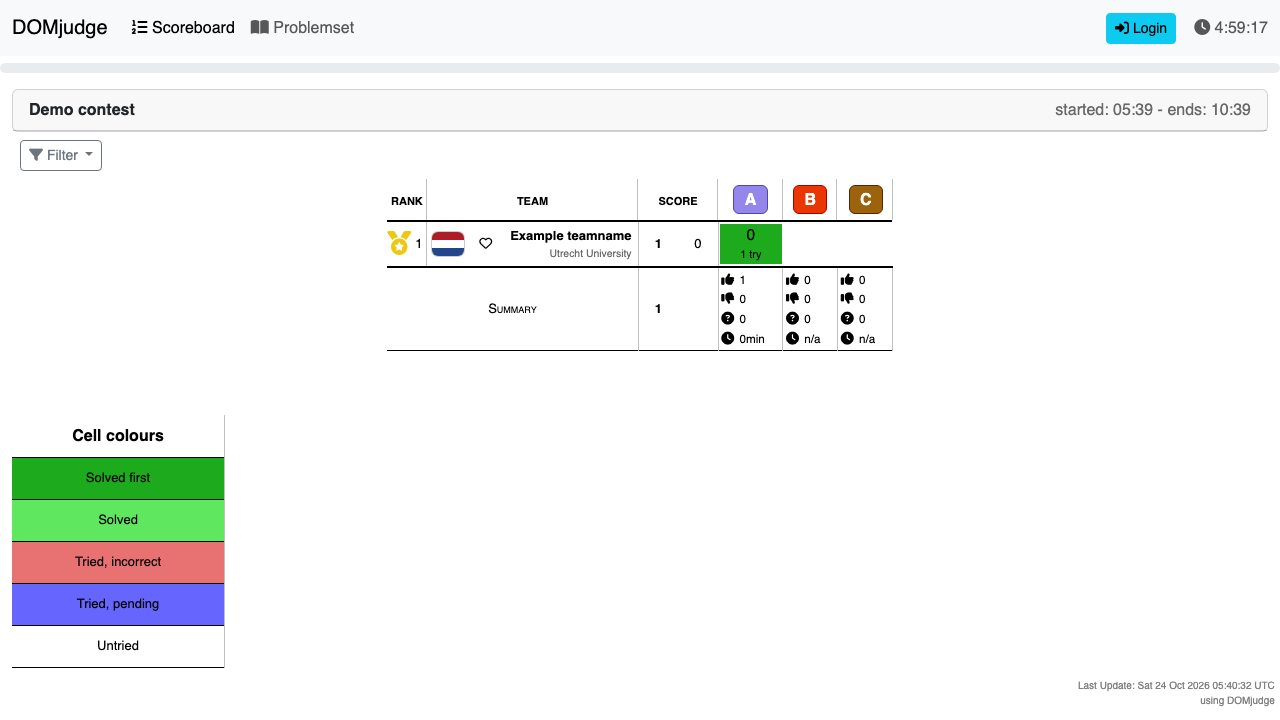
- The certificate is self-signed and unique to your instance, so the browser warns the first time. Accept it, or install a trusted certificate (Step 9).
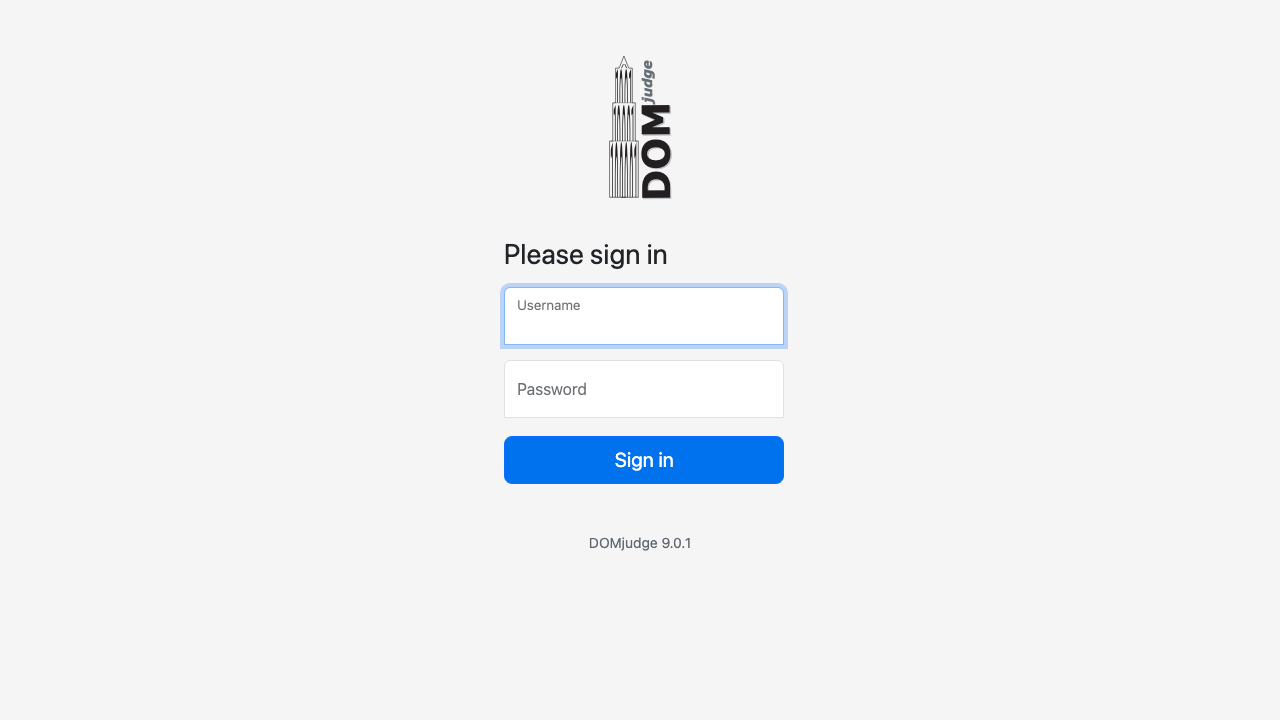
- Choose Login, enter admin and the
domjudge.admin.passvalue, and sign in.
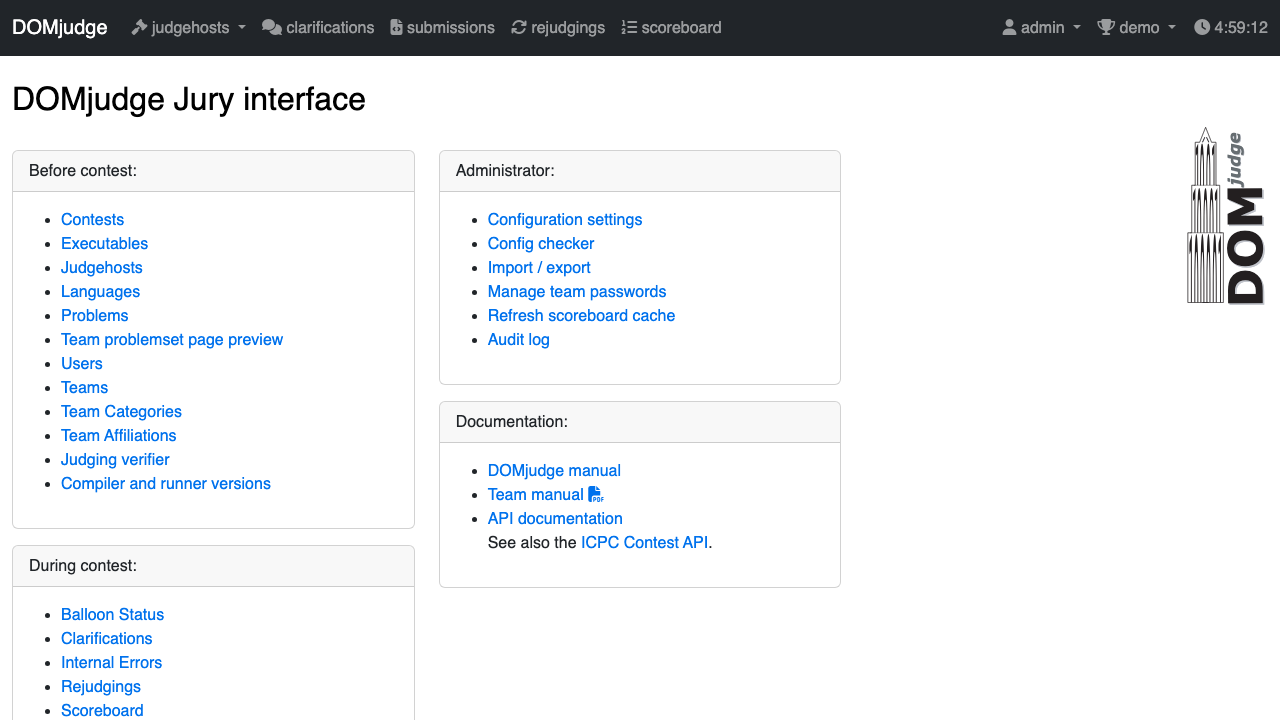
You land in the jury interface. Before contest holds contests, problems, languages, teams and users; During contest holds clarifications, submissions, rejudgings and the scoreboard; Administrator holds the configuration settings and the config checker.
Step 7: Judge a first submission
The demo contest (demo) runs from first boot for five hours and has three problems: hello, fltcmp and boolfind. Submit a correct solution to hello as the demo team through the REST API, then read the verdict as the jury:
D=$(sudo sed -n 's/^domjudge.demo.pass=//p' /root/domjudge-credentials.txt)
P=$(sudo sed -n 's/^domjudge.admin.pass=//p' /root/domjudge-credentials.txt)
printf '#include <stdio.h>\nint main(void) { puts("Hello world!"); return 0; }\n' > /tmp/hello.c
SID=$(curl -s -u "demo:${D}" -F problem=hello -F language=c -F "code[]=@/tmp/hello.c" \
  http://127.0.0.1/api/v4/contests/demo/submissions | python3 -c 'import sys,json;print(json.load(sys.stdin)["id"])')
for i in $(seq 1 30); do
  V=$(curl -s -u "admin:${P}" "http://127.0.0.1/api/v4/contests/demo/judgements?submission_id=${SID}" \
      | python3 -c 'import sys,json;print(next((j["judgement_type_id"] for j in json.load(sys.stdin) if j.get("end_time")), ""))')
  [ -n "${V}" ] && break; sleep 2
done
echo "submission ${SID}: ${V}"
It prints the submission ID and AC (accepted). The submission appears in the jury's Submissions list with the result CORRECT, and on the scoreboard.
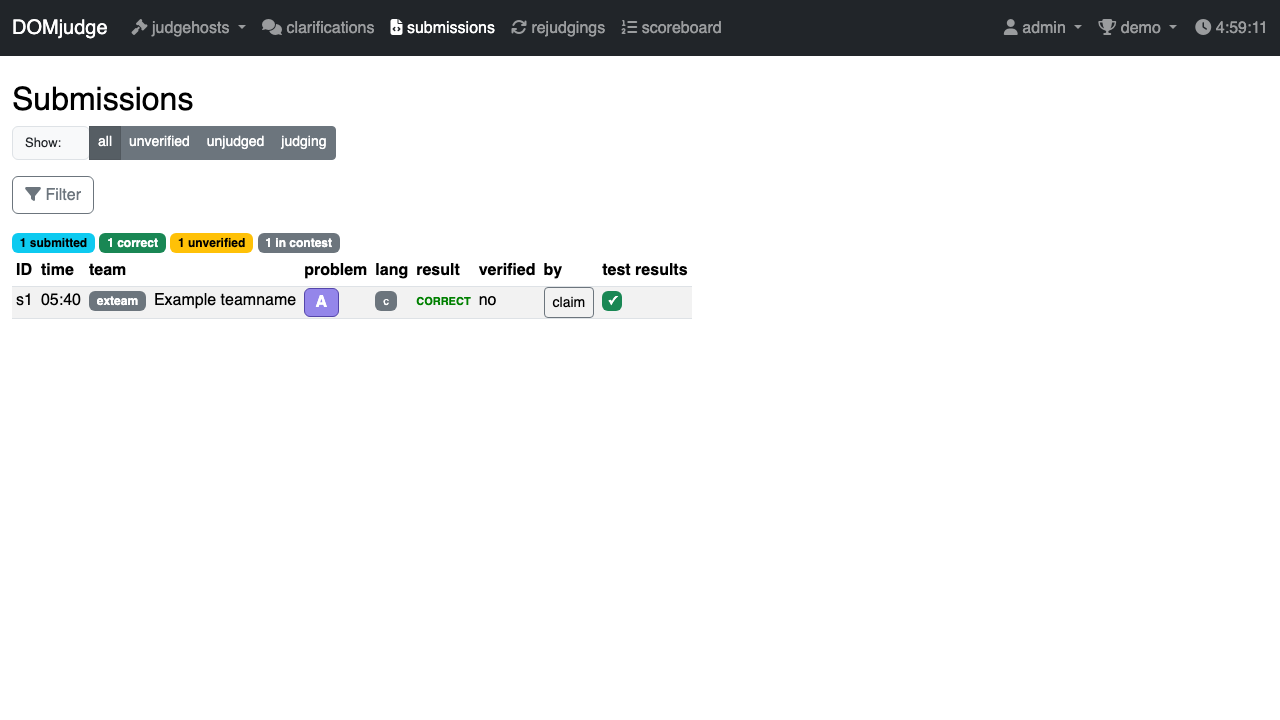
Teams normally submit through the team interface: they sign in with their own account, choose Submit, pick the problem and language, and upload their source file.
Step 8: Use your own hostname
To serve the site on your own DNS name, point a DNS record (for example in Amazon Route 53) at the instance's public IP (an Elastic IP keeps it stable), then run on the instance:
sudo domjudge-set-hostname contest.example.org
The helper writes the name to /etc/cloudimg/domjudge-hostname, sets the nginx server_name, issues a new self-signed certificate for the name, updates domjudge.url in the credentials file and reloads nginx. An instance without an Elastic IP gets a new public DNS name when it is stopped and started; run the helper with the new name.
Step 9: Install a trusted certificate
The site certificate is /etc/ssl/domjudge/domjudge.crt and its key /etc/ssl/domjudge/domjudge.key (mode 600, root). To use Let's Encrypt, first set your DNS name (Step 8), open port 80 to the internet, then:
sudo apt-get install -y certbot
sudo certbot certonly --standalone -d contest.example.org \
  --pre-hook "systemctl stop nginx" --post-hook "systemctl start nginx" \
  --deploy-hook "install -m 644 \$RENEWED_LINEAGE/fullchain.pem /etc/ssl/domjudge/domjudge.crt && install -m 600 \$RENEWED_LINEAGE/privkey.pem /etc/ssl/domjudge/domjudge.key"
certbot keeps the hooks for every renewal. Running domjudge-set-hostname again replaces the certificate with a self-signed one, so run sudo certbot renew --force-renewal afterwards. For a certificate from another authority, copy the full chain and key to the same two paths and run sudo systemctl reload nginx.
Step 10: Set up your own contest
- In the jury interface open Contests and create a contest (or edit
demo): set its short name, start and end times, and make it public or private. - Under Problems import problems as Kattis/ICPC problem packages (zip), then add them to the contest.
- Under Teams and Users create the teams and one user per team (or import them as TSV/JSON under Import / export). Manage team passwords generates passwords for every team.
- Under Languages enable the languages your contest allows. The judging chroot ships compilers for C, C++, Java and Python 3 (PyPy).
- Use Config checker to confirm the setup before the contest starts.
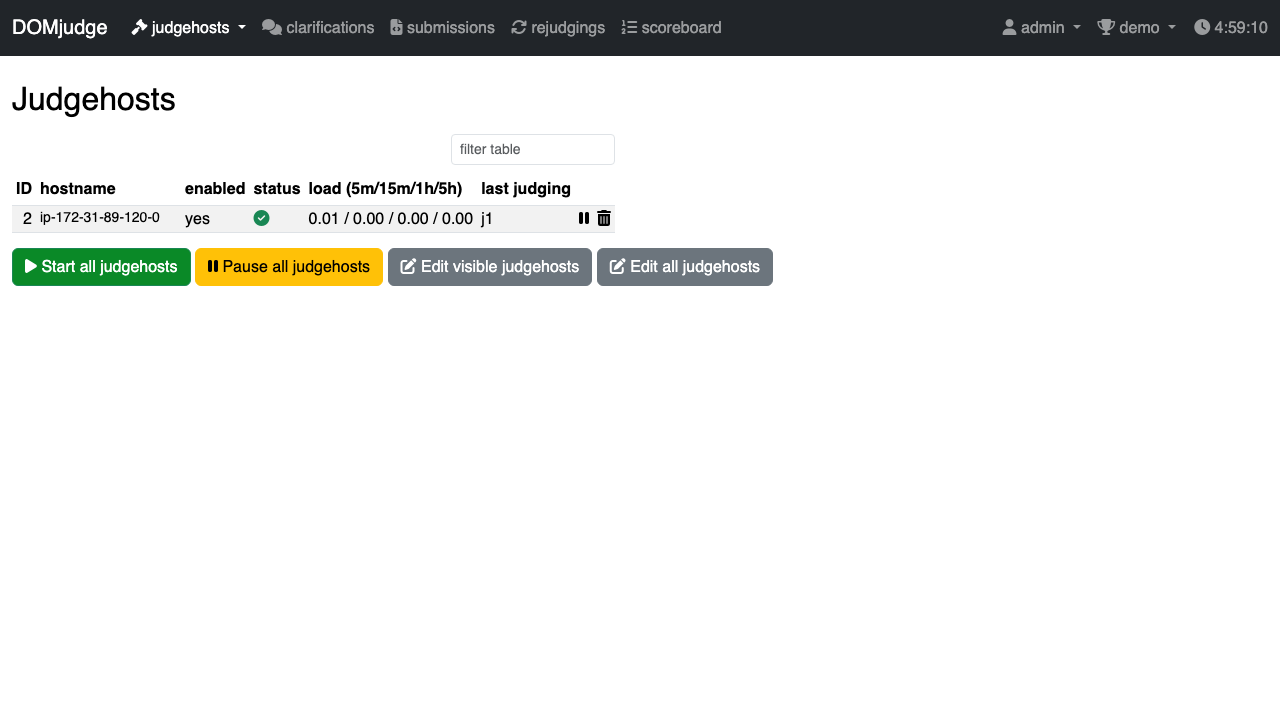
More judging capacity. The local judgehost judges one submission at a time. For a larger contest, install DOMjudge's judgehost on additional instances (same release, 9.0.1) and point them at https://<your-host>/api with the judgehost user and domjudge.judgehost.pass from Step 4 in their restapi.secret. Open 443 from those instances only.
Step 11: Server components
| Component | Version | Notes |
|---|---|---|
| DOMjudge | 9.0.1 | Official release tarball, GPL-2.0-or-later, installed in /opt/domjudge |
| PHP libraries | Symfony 6.4.48, Twig 3.30, league/commonmark 2.10 | DOMjudge's bundled libraries updated to their latest releases within DOMjudge's own version constraints, to include published security fixes |
| nginx | Ubuntu 24.04 package (1.24) | TLS front end on 80/443 and the loopback judgehost channel |
| PHP | 8.3 (FPM) | DOMjudge's own pool on a unix socket |
| MariaDB | 10.11 | 127.0.0.1 only; created on first boot |
| Judging chroot | Ubuntu 24.04 (debootstrap) | GCC, G++, OpenJDK, PyPy 3 |
grep DOMJUDGE_VERSION /opt/domjudge/domserver/etc/domserver-static.php
nginx -v 2>&1; php -v | head -n 1; mariadb --version
Step 12: Filesystem layout
| Path | Purpose |
|---|---|
/opt/domjudge/domserver |
domserver: web application, bin/dj_console, etc/ secrets (mode 640, root:www-data) |
/opt/domjudge/judgehost |
judgehost: bin/judgedaemon, bin/runguard, etc/restapi.secret, judgings/ work area |
/chroot/domjudge |
The chroot submissions are compiled and run in |
/etc/nginx/sites-available/domjudge |
nginx site; /etc/nginx/domjudge-host.conf holds the configured name |
/etc/ssl/domjudge/ |
Site certificate and key |
/etc/cloudimg/domjudge-hostname |
Your configured site name (created by domjudge-set-hostname) |
/var/lib/mysql |
MariaDB data (created on first boot) |
/root/domjudge-credentials.txt |
Your credentials (mode 600, root) |
/var/lib/cloudimg/domjudge-firstboot.done |
First boot marker; nginx and the judgehost start only when it exists |
Step 13: Managing the services
systemctl status nginx php8.3-fpm mariadb domjudge-judgedaemon@0 --no-pager -n 0
Restart the judgehost with sudo systemctl restart domjudge-judgedaemon@0 and reload nginx with sudo systemctl reload nginx. DOMjudge's command-line tools run as the web server user, for example sudo -u www-data /opt/domjudge/domserver/bin/dj_console list domjudge. The Amazon CloudWatch agent can ship /var/log/nginx/*.log to CloudWatch Logs.
Step 14: Backups
DOMjudge's own tool dumps the database (as root, over the local socket):
sudo /opt/domjudge/domserver/bin/dj_setup_database -s dump domjudge-$(date +%Y%m%d)
sudo ls /opt/domjudge/domserver/db-dumps/
The dump holds every account's password hash, so keep it private (sudo chmod 600 it, and encrypt it at rest in S3). Copy the dump to an Amazon S3 bucket or another durable destination; dj_setup_database -s load <name> restores it. EBS snapshots of the root volume are a simple whole-instance backup:
aws ec2 create-snapshot --volume-id <volume-id> --description "domjudge $(date +%F)"
Step 15: Troubleshooting
The browser cannot connect, or the connection is dropped. Browse to the configured name (domjudge.url in Step 4); other host names are dropped by design. Check that ports 80 and 443 are open in the security group.
nginx or the judgehost is not running after launch. Both start only after first boot completes:
ls -la /var/lib/cloudimg/domjudge-firstboot.done
sudo journalctl -u domjudge-firstboot --no-pager | tail -n 20
Submissions stay pending. Check that the judgehost is running and enabled (jury Judgehosts page, or systemctl status domjudge-judgedaemon@0), and look at its log with sudo journalctl -u domjudge-judgedaemon@0 --no-pager | tail -n 30. The contest must be active and the language enabled.
Step 16: Security recommendations
- Keep port 22 limited to your management network, and limit 80/443 to your contest network during a contest if you can.
- Change the admin password under Users if you share it with anyone, and give each jury member their own account with the jury role.
- Teams' code runs inside runguard's sandbox (its own network namespace, the chroot, CPU and memory limits); keep the judgehost on the same release as the domserver.
- The bundled PHP libraries were updated within DOMjudge's version constraints when the image was built. One library, enshrined/svg-sanitize 0.22 (used only when a jury member or administrator uploads or imports a problem with an SVG image), has advisories fixed only in a newer major release that DOMjudge 9.0.1 does not accept; only import problem packages from sources you trust.
- Apply Ubuntu security updates regularly (
sudo apt-get update && sudo apt-get upgrade); unattended security updates are enabled.
Step 17: Support and licensing
DOMjudge is licensed under the GNU General Public License version 2 or later; some bundled components are under the MIT and BSD licences (COPYING, COPYING.MIT and COPYING.BSD in the DOMjudge 9.0.1 source release at domjudge.org). DOMjudge is a trademark of its developers; cloudimg is not affiliated with or endorsed by the DOMjudge project.
cloudimg provides 24/7 technical support by email and live chat: support@cloudimg.co.uk. Every product in this listing is on the Hardened Moodle & E-Learning Platforms AMIs guide hub.