Base
Hardened build
minimal ports, security patches applied at build time
FrankenPHP, the modern PHP application server with worker mode and automatic HTTPS, serving on first boot.
FrankenPHP is a modern PHP application server built on the Caddy web server. It embeds the PHP interpreter and Caddy in a single self contained binary, adding worker mode, automatic HTTPS, early hints and real time features, so you run high performance PHP without wiring together a separate web server and a PHP FPM pool.
cloudimg ships FrankenPHP hardened, fully patched and preconfigured, serving a demo PHP app over HTTPS the moment it boots. The Caddy admin API is disabled for a secure by default posture, and every instance generates its own self signed TLS certificate on first boot. Backed by 24/7 support.
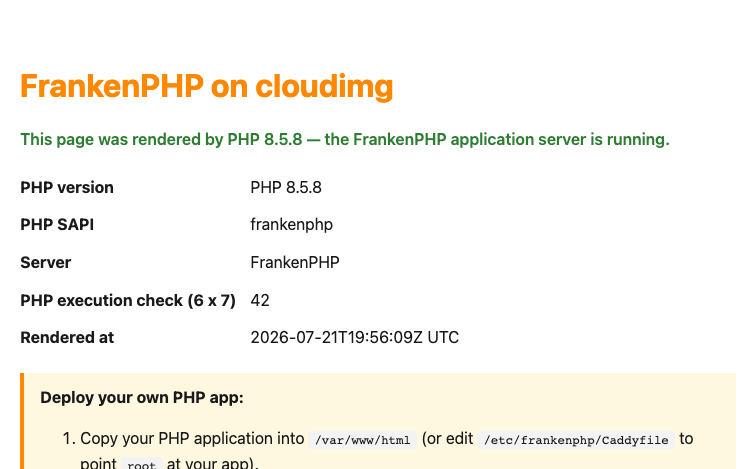
Real screenshots taken while testing this image against its deployment guide.
This is a repackaged open source software product wherein additional charges apply for cloudimg support services.
Overview
FrankenPHP is a modern PHP application server built on top of the Caddy web server. It embeds the PHP interpreter and Caddy into a single self contained binary, so you run high performance PHP without wiring together a separate web server and a PHP FPM pool. FrankenPHP adds worker mode for long running application workers, automatic HTTPS, early hints, and real time features such as server sent events and the Mercure hub, while remaining fully compatible with your existing PHP applications. This cloudimg AMI delivers FrankenPHP fully installed and configured on Amazon EC2, running as a hardened systemd service, so a working PHP application server is answering requests over HTTPS within minutes of launch.
Demo App That Proves PHP Execution
The server is driven entirely by a plain text Caddyfile at /etc/frankenphp/Caddyfile. A small demo PHP application ships in the document root at /var/www/html so a freshly launched instance immediately demonstrates end to end PHP execution: browse to the instance over HTTPS and the landing page reports the exact PHP runtime version it was rendered by. Drop your own PHP application into the document root, or point the Caddyfile at your application entry point, and restart the service to go live.
Application Stack
FrankenPHP runs as a dedicated non root service with the Linux CAP_NET_BIND_SERVICE capability so it can bind the privileged web ports. It serves your application over HTTPS on port 443 and permanently redirects plain HTTP on port 80 to HTTPS. The embedded PHP interpreter and Caddy web server are a single static binary with no runtime library dependencies, so there is no PHP FPM socket to manage and no separate web server to keep in sync.
Secure By Default
FrankenPHP embeds Caddy, whose administration interface can rewrite the running configuration over the network. This image disables that administration interface entirely, so it does not listen on any interface, which removes a powerful remote configuration surface. On the first boot of your instance a one shot service generates a fresh per instance self signed TLS certificate bound to that instance address, so the server answers over HTTPS immediately with no shared or default certificate and no shared or default credentials of any kind, since FrankenPHP has no login. If you own a domain name you can switch to fully automatic HTTPS with a trusted certificate by editing a single Caddyfile block.
AWS Integrations
Key Capabilities
Ready To Use
Review the shipped Caddyfile and the demo application, deploy your own PHP code into the document root, open port 443 to your users, and optionally point a domain at the instance for a trusted certificate. cloudimg engineers can walk you through worker mode tuning, HTTPS and certificate options, and deploying popular PHP frameworks after purchase.
cloudimg Support
24/7 technical support by email and live chat, with a one hour average response time for critical issues. Contact support@cloudimg.co.uk before or after purchase for deployment help, configuration changes, or refund requests.
All product and company names are trademarks or registered trademarks of their respective holders. Use of them does not imply any affiliation with or endorsement by them.

Apache Kafka, the open source distributed event streaming platform, preinstalled in KRaft mode with OpenJDK 17 and a bun...

This image runs Apache Tomcat 11, the open source implementation of the Jakarta Servlet, Jakarta Pages, Jakarta Expressi...

This image runs Bun, the fast all-in-one JavaScript and TypeScript toolkit: a single native binary that is a runtime, a ...

This image runs Caddy, the open source web server and reverse proxy, fully installed and configured from the official Ca...
On Windows: 1. Press Win + R, type mstsc, and press Enter 2. Enter the public IP address of your instance 3. Click Conne...
Red Hat JBoss Enterprise Application Platform (JBoss EAP) is a production-ready Jakarta EE application server for buildi...