Base
Hardened build
minimal ports, security patches applied at build time

host based file integrity monitoring that reports exactly what was added, changed or removed
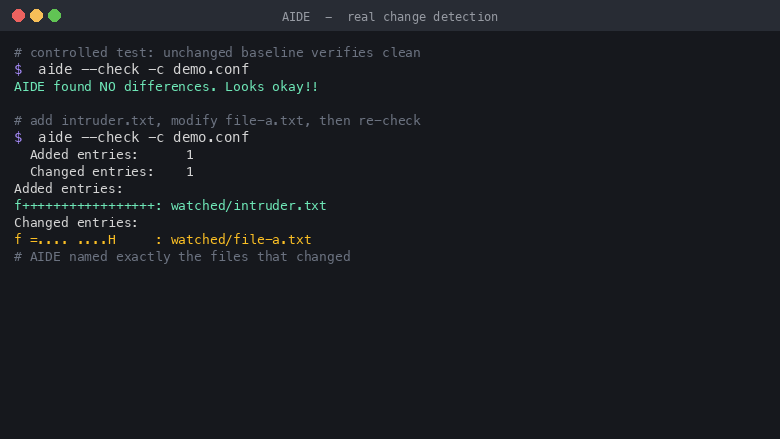
AIDE (Advanced Intrusion Detection Environment) is an open source host based file and directory integrity checker. It builds a cryptographic baseline of the attributes of the files it watches, permissions, ownership, size, timestamps and content hashes, and on every run reports exactly what has been added, removed or changed against that baseline. It is a host intrusion detection staple and a direct answer to compliance controls that mandate file integrity monitoring, such as PCI DSS requirement 11.5 and the CIS Benchmarks. There is no daemon, no network port and no credential: it is a purely local command line tool driven over SSH.
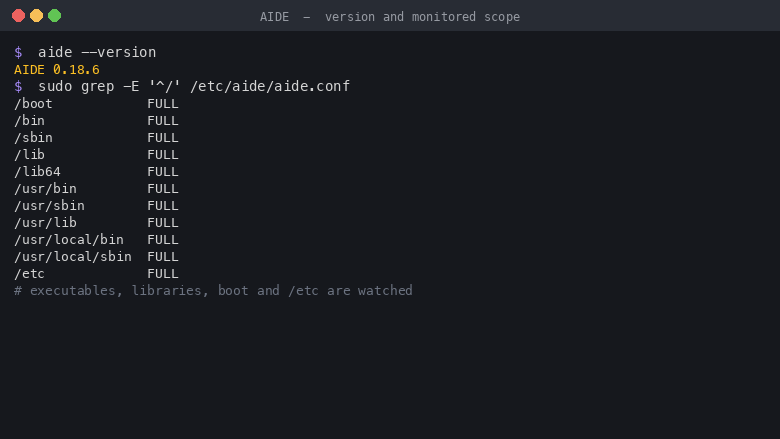
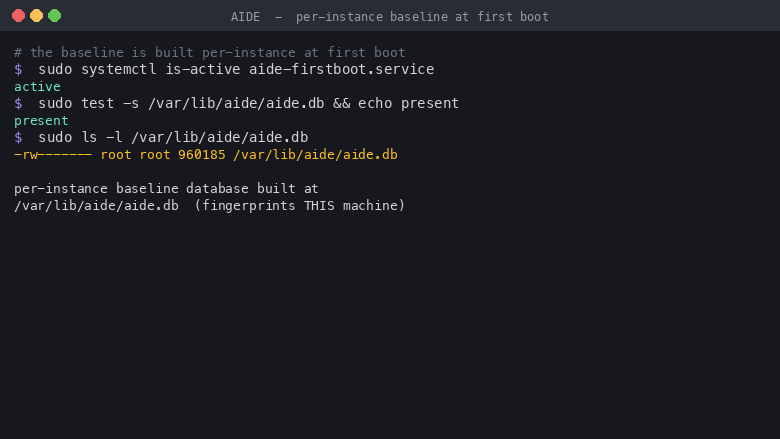
The cloudimg image builds the baseline per instance at first boot, so it fingerprints your own machine rather than the build server and the very first check is meaningful instead of drowning in spurious differences. It ships a focused, hardened monitored scope covering executables, libraries, boot and configuration, a systemd timer that runs a daily check and writes the report to a log ready for your pipeline, and a fail closed design that refuses to run a check without a valid baseline. AIDE installs from the operating system archive so it stays covered by standard security updates, and the image is paired with a step by step deploy guide and 24/7 support.
Real screenshots taken while testing this image against its deployment guide.
This is a repackaged open source software product wherein additional charges apply for cloudimg support services.
## Overview
AIDE (Advanced Intrusion Detection Environment) is the open source, GPL-2.0 licensed host-based file and directory integrity checker. It builds a cryptographic baseline database of the attributes of the files it watches - permissions, ownership, inode, size, timestamps and content hashes - and on every subsequent run reports exactly what has been added, removed or changed against that baseline. It is a host intrusion detection staple and a direct answer to compliance controls that mandate file-integrity monitoring, such as PCI-DSS requirement 11.5 and the CIS Benchmarks. This AMI delivers AIDE fully configured as a ready-to-run integrity-monitoring appliance - SSH in and the baseline and scheduled check are already in place.
## Why Choose This AMI Over Self-Installation
Standing AIDE up correctly is more subtle than installing a package: the baseline must be built on the real machine, the monitored scope must be tuned so the daily check is meaningful without drowning in noise, and the schedule and reporting must be wired up. This AMI handles all of it:
## How File-Integrity Monitoring Works Here
## Getting Started
1. Launch the AMI on your preferred EC2 instance type
2. Connect over SSH using your key pair
3. Confirm the per-instance baseline built at first boot with sudo aide --check --config=/etc/aide/aide.conf
4. Review the daily report at /var/log/aide/aide.log
5. After any intentional change, refresh the baseline with sudo aideinit
## Security Practices
AIDE is installed unmodified from the operating system's official package archive, so it is covered by standard unattended security updates. The baseline database is generated per instance and stored read-restricted; for real tamper assurance, move a copy of the baseline off the instance or to read-only media. SSH access uses key-based authentication. AIDE opens no network socket and runs no daemon.
## Use Cases
## cloudimg Support
24/7 technical support by email and live chat covers baseline initialization and updates, tuning the monitored scope, interpreting integrity reports, wiring the schedule and reports into a log pipeline, and moving the baseline off-box for stronger assurance. Critical issues receive a one-hour average response.
## Next Steps
Contact support@cloudimg.co.uk to request a sample integrity report, schedule a monitored-scope tuning walkthrough, or ask any pre-purchase questions about the product.
All product and company names are trademarks or registered trademarks of their respective holders. Use of them does not imply any affiliation with or endorsement by them.

This image runs Apache Directory Server (ApacheDS) 2.0, the Apache Software Foundation's extensible, embeddable director...

This image runs Certimate, the open source platform that automates the full life cycle of your SSL/TLS certificates.

This image runs Clair, the open source project for the static analysis of vulnerabilities in application containers.

KeePass is a free, open source password manager that stores all your passwords in a highly encrypted database. The datab...

This image runs OpenSCAP, the reference open source implementation of the Security Content Automation Protocol (SCAP).

This image runs CrowdSec, the free and open source collaborative behavioural security engine.