Base
Hardened build
minimal ports, security patches applied at build time

Self hosted load and performance testing with a live web dashboard and Python scenarios.
Locust is an open source load testing tool. You describe how simulated users behave in a small Python file, then Locust swarms thousands of those users at a target system and reports response times, throughput and failures live in a web dashboard and a matching JSON stats API. Because scenarios are plain Python, tests are easy to read, version control and extend, from a single endpoint check to a full user journey.
It suits developers, QA engineers and site reliability teams who want to measure how a web app, API or service holds up under load, and to catch regressions before real users do.
The cloudimg image runs Locust as a dedicated non root service bound only to the loopback interface, behind an nginx reverse proxy, so the web UI is never exposed unauthenticated. The Locust interface ships with no login of its own, so this image secures it out of the box with HTTP Basic authentication whose password is generated on first boot and stored in a root only file, unique to each instance with nothing baked into the image. A ready to run sample scenario ships on the image, and the paired deployment guide covers first sign in, running a test and writing your own scenarios, with 24/7 support on every deployment.
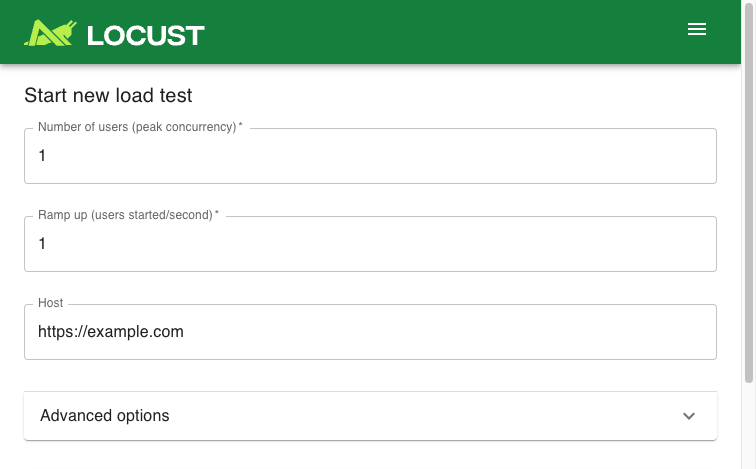
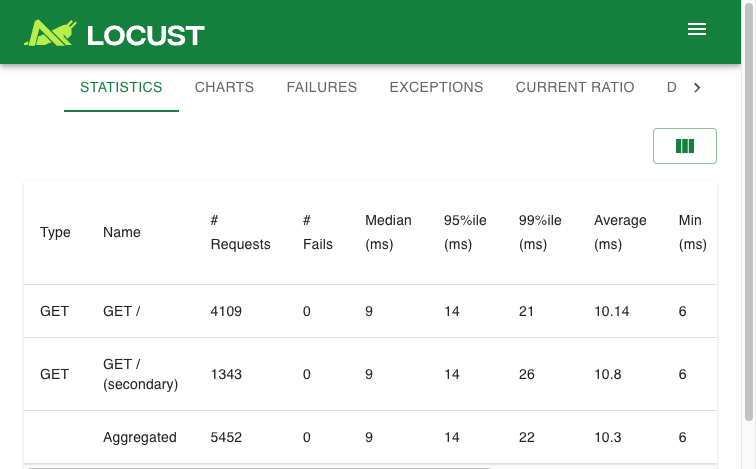
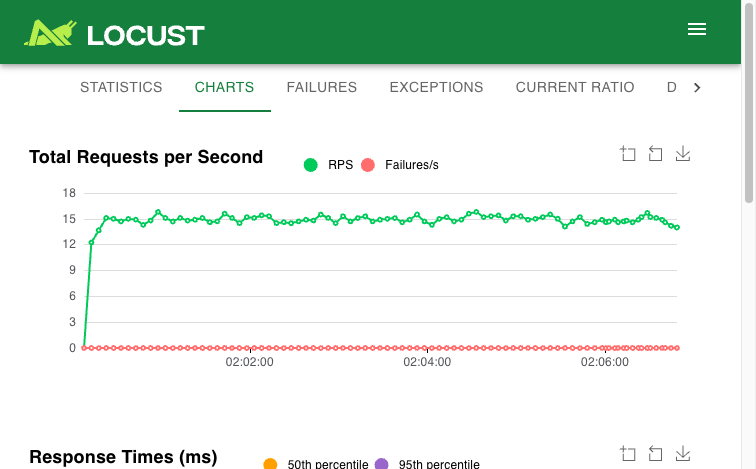
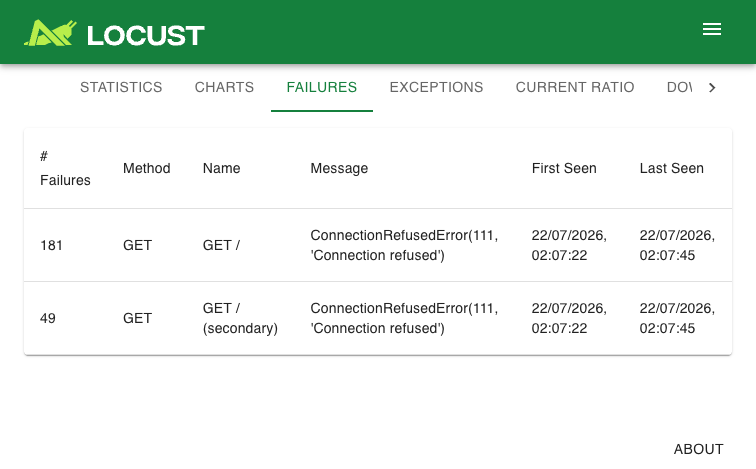
Real screenshots taken while testing this image against its deployment guide.
This is a repackaged open source software product wherein additional charges apply for cloudimg support services.
## Overview
Locust is a popular open source, developer-friendly distributed load-testing tool. You write your load scenarios as plain Python code in a locustfile, then Locust swarms simulated users at your target system and reports response times, throughput and failures live in a browser-based web dashboard. This AMI delivers a fully installed, security-hardened Locust appliance so a working load generator is operational within minutes of launch - giving you a private, self-hosted performance-testing instance you run and control in your own AWS account.
## Why This Image vs a Manual Install
This image eliminates the manual Python environment setup, systemd service authoring, reverse-proxy configuration, and credential hardening that a bare install requires. Locust's web UI normally ships with no authentication of its own - anyone who can reach it can start, stop and reconfigure load tests, and therefore drive traffic at an arbitrary target. This image never leaves it exposed: Locust is pinned into a self-contained virtual environment and bound to the loopback interface, and an nginx reverse proxy fronts it with HTTP Basic authentication whose password is generated uniquely on each instance's first boot. Launch the instance, read your unique credential, and start a test.
## Application Stack
Locust is installed from the official Python package index into a pinned, self-contained virtual environment under /opt/locust, and runs as an unprivileged system user under a hardened systemd unit bound to the loopback interface only. An nginx reverse proxy on port 80 forwards to it, upgrading the connection for the live-stats websocket stream and enforcing HTTP Basic authentication. systemd starts the load tester and the web server on boot and restarts them on failure. A representative sample locustfile ships in the image so a test runs out of the box.
## Security Hardening
This image follows a defence-in-depth approach:
Buyers requiring formal compliance documentation should contact cloudimg to discuss specific requirements.
## Concrete Use Cases
## AWS Integration
Deploy on any EC2 instance type; larger instances generate more concurrent simulated users. Use the unauthenticated health endpoint with an Application Load Balancer for availability monitoring. Place the load generator in a VPC subnet with security-group control over what it can reach, and forward its logs to CloudWatch for long-running test runs. Snapshot the instance with EBS or AWS Backup once you have loaded your own locustfiles.
## Getting Started
Read your credential from the root-only file, open the web interface in your browser, sign in, set a target Host and the number of users, and start the swarm. Watch requests, failures and response-time percentiles update live, then edit the shipped sample locustfile or upload your own scenarios to model real traffic.
## cloudimg Support
24/7 technical support by email and chat. Help with deployment, reverse-proxy termination with your own domain and certificate, writing and structuring locustfiles, distributed multi-worker test setups, and interpreting the live statistics.
This image runs Apache Archiva, the open source build-artifact repository manager - a central, governed store for the bi...

Apache JMeter is the de-facto open-source tool for load and performance testing of web applications, APIs, databases and...

This image runs Appsmith Community Edition, the open source low-code platform for building internal tools, admin panels,...

This image runs Atlantis 0.46 (Apache-2.0), the open source server that automates Terraform and OpenTofu pull request wo...

Pre-configured self-hosted Atuin sync server: an end-to-end-encrypted, searchable shell-history sync backend for the Atu...

This image runs BaGetter, a lightweight self-hosted NuGet package feed server, as a hardened systemd service on Ubuntu 2...