
etcd - Hardened Distributed Key Value Store for AWS
Overview
Launch a production-ready etcd key value store with RBAC enabled in minutes. Eliminates manual security setup with auto-generated credentials and 24/7 cloudimg support.
See it running
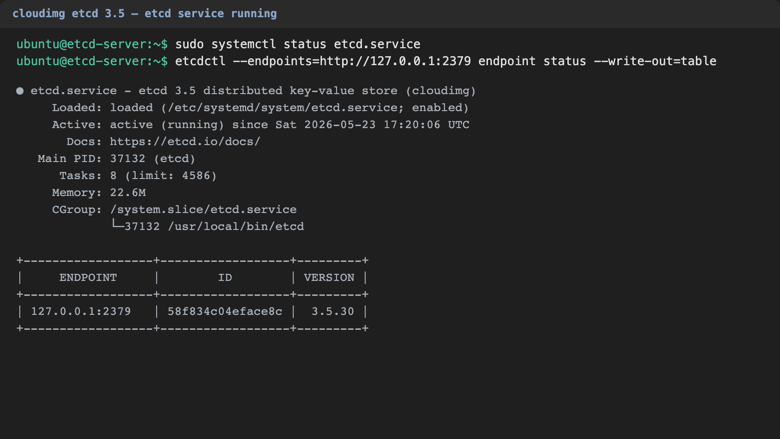
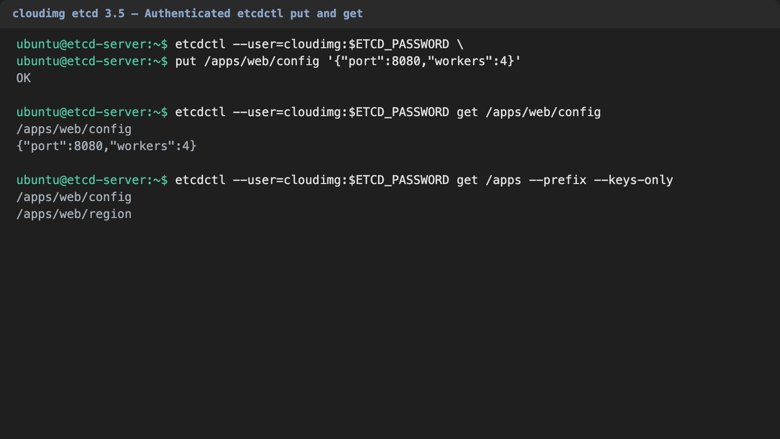
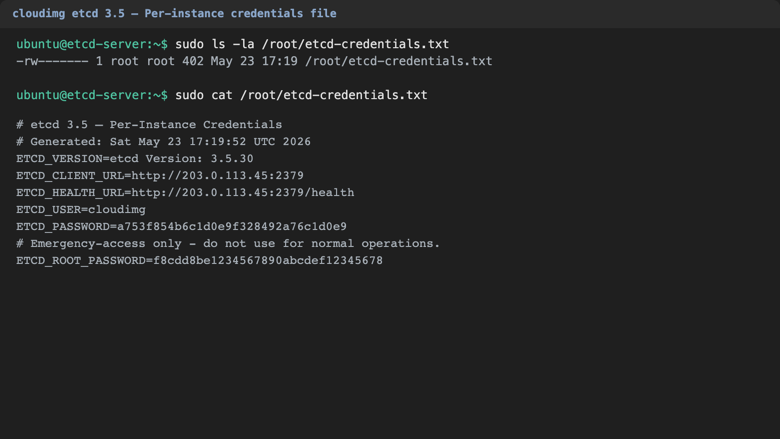
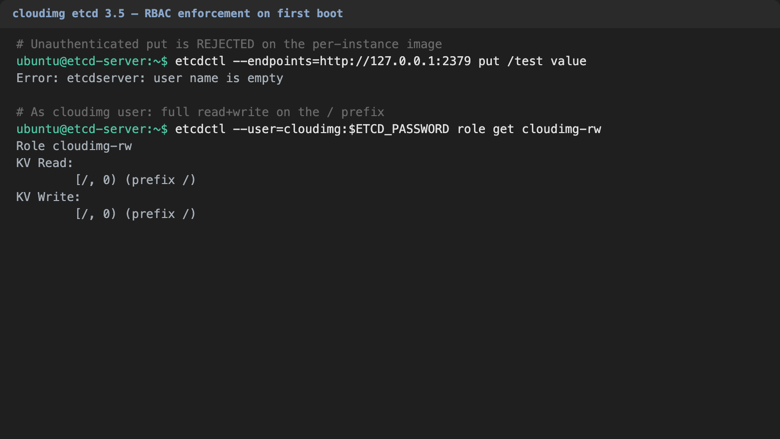
Real screenshots of this software running on the cloudimg image, taken while testing the deployment guide.
Description
This is a repackaged open source software product wherein additional charges apply for cloudimg support services.
## Why This AMI Instead of Self-Managed etcd
Deploying etcd manually requires generating TLS certificates, configuring Role Based Access Control, writing systemd units, hardening file permissions, and resolving advertise URLs - a process that can take hours and introduces security risk if any step is missed. This AMI eliminates that operational burden. Within minutes of launch you have a hardened, authenticated etcd instance running on AWS with no manual configuration required. Compared to container-based Helm charts or bare apt-install approaches, you gain a pre-secured single-node deployment backed by expert 24/7 support from cloudimg.
## Overview
etcd is a strongly consistent, highly available, distributed key value store designed to reliably store the most critical data of a distributed system. It is the canonical state store behind Kubernetes, CoreDNS, OpenShift and many other distributed systems. This image delivers etcd fully installed and configured as a single node deployment with Role Based Access Control enabled, so a hardened key value service is running within minutes of launch.
## Application Stack
etcd 3.5 running as a native binary from the official etcd-io GitHub release. The client port 2379 serves applications; the peer port 2380 stays loopback only for the single node default. etcdctl is preinstalled at /usr/local/bin/etcdctl for command line management. The /health endpoint on port 2379 is anonymous by design so Kubernetes liveness and readiness probes work out of the box.
## Secure First Boot
On the first boot of your instance a one-shot service generates a fresh per-instance cloudimg user password and a separate emergency root password, writes them to a root-only file, configures etcdctl Role Based Access Control, and refuses to leave authentication disabled. The advertise URL is rewritten with the instance address resolved from EC2 IMDSv2. No manual security steps are needed - authentication is enforced from the moment the instance is reachable.
## Ready To Use
The etcd server, data directory, Role Based Access Control roles and systemd units are all configured. Point your distributed application at port 2379 with the cloudimg user, or sign in to the instance and use etcdctl to manage keys, roles and members directly.
## Use Cases With Scenario Detail
- SaaS Platform Kubernetes Control Plane: Teams running 10-50 node Kubernetes clusters on EC2 who need a reliable, secured state store without managing etcd operators or Helm chart upgrades.
- Fintech Service Discovery: Financial services teams using CoreDNS or Consul-like patterns that require strongly consistent configuration data with RBAC to meet compliance requirements.
- Blue-Green Deployment Coordination: Platform engineering teams needing a leader election and feature flag backplane to coordinate zero-downtime deployments across multiple availability zones.
- Development and Proof of Concept: Individual developers or small teams evaluating distributed key value patterns before committing to a multi-node production cluster.
## cloudimg Support
24/7 technical support by email and chat. Help with etcd deployment, cluster expansion to multi-node topologies, RBAC design, performance tuning and monitoring. Book a free 15-minute cluster planning consultation by contacting our team to discuss your expansion or production hardening needs.
All product and company names are trademarks or registered trademarks of their respective holders. Use of them does not imply any affiliation with or endorsement by them.
Key Features
- etcd preinstalled and ready as a single node distributed key value store, with Role Based Access Control enabled at first boot and the etcdctl command line preinstalled
- Hardened first boot generates a fresh per instance cloudimg user password and a separate emergency root password, both stored in a file only the root user can read
- 24/7 technical support from cloudimg, with expert assistance for etcd deployment, cluster expansion, RBAC design and performance tuning
Related Technologies
Related Products

Apache Flink Stream Processing
Apache Flink is the open source framework and distributed processing engine for stateful computations over unbounded and...

Apache Kafka
Apache Kafka, the open source distributed event streaming platform, preinstalled in KRaft mode with OpenJDK 17 and a bun...

Apache Solr 9Enterprise Search
Apache Solr is the open source enterprise search platform built on Apache Lucene.

Apache Tomcat 11
This image runs Apache Tomcat 11, the open source implementation of the Jakarta Servlet, Jakarta Pages, Jakarta Expressi...
Apache ZooKeeper Coordination Service
Apache ZooKeeper is a high performance coordination service for distributed applications.
Calibre-Web Self-Hosted Ebook Server
This image runs Calibre-Web from a dedicated Python virtual environment, served on the loopback interface and fronted by...