Base
Hardened build
minimal ports, security patches applied at build time

yarr, yet another rss reader, a fast self hosted RSS and Atom feed reader with an embedded web interface and SQLite storage that keeps your reading entirely on infrastructure you control.
yarr (yet another rss reader) is a fast, lightweight, self hosted RSS and Atom feed reader and aggregator. It is a single Go binary with an embedded web interface and an embedded SQLite database, so it stays small, starts instantly and keeps your reading history entirely on infrastructure you control. Subscribe to any website's feed, organise subscriptions into folders, and read articles in a clean reading view with unread tracking, full text search, a built in readability mode and OPML import and export. A system based light and dark theme follows your browser preference.
It suits anyone who wants a private, self owned news and content reader instead of relying on a third party service.
cloudimg delivers yarr fully installed behind an nginx reverse proxy, so the reader answers the moment the instance boots. The image is secure by default: yarr binds only to loopback, built in login is switched on, and there is no default password. The administrator password is generated uniquely on each instance's first boot and is never baked into the image, the reader starts only after that credential is written so it never comes up unprotected, and a small set of self contained demo feeds means the interface is populated the moment you sign in. Everything is backed by 24/7 support.
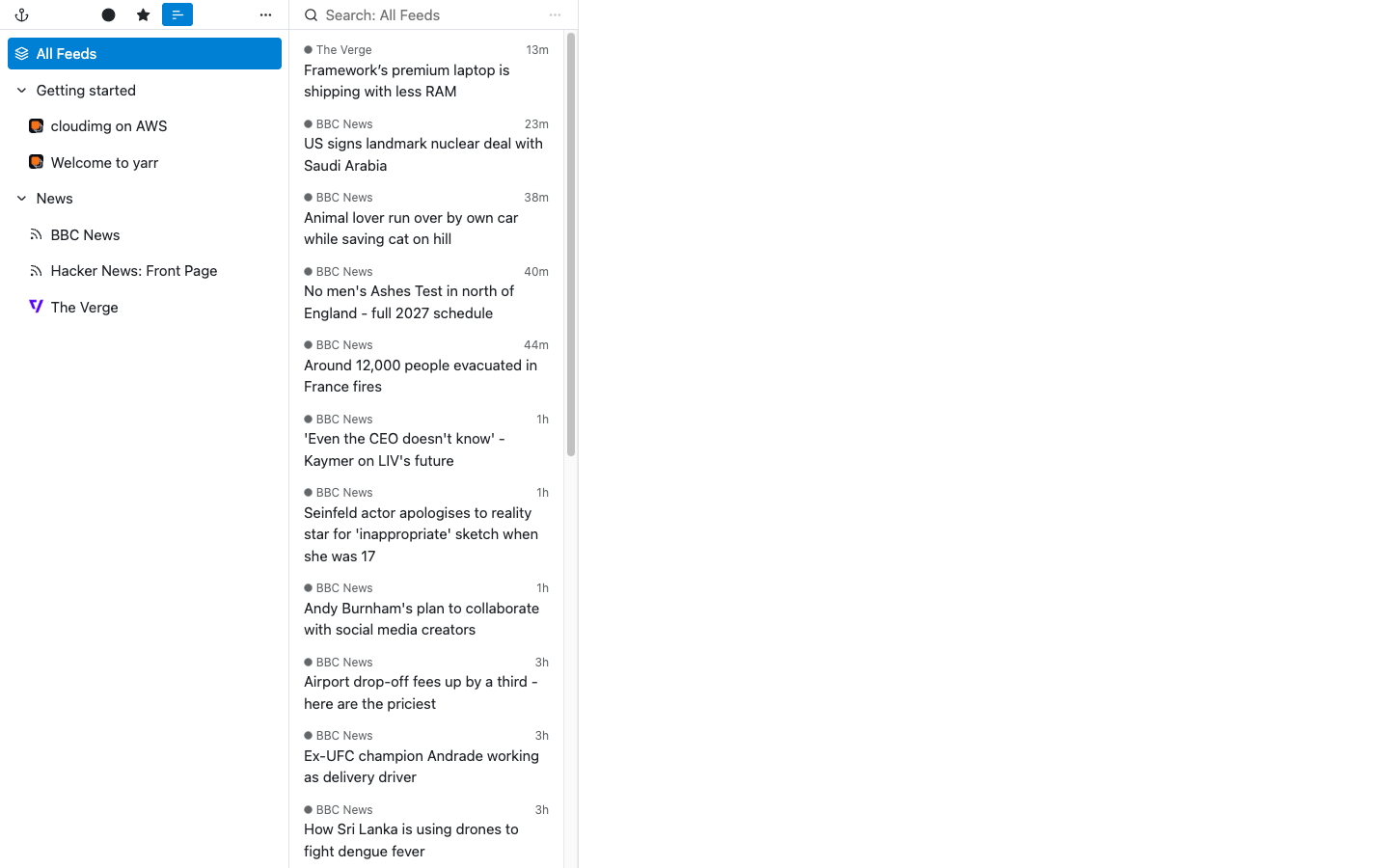
Real screenshots taken while testing this image against its deployment guide.


This is a repackaged open source software product wherein additional charges apply for cloudimg support services.
## Overview
yarr (yet another rss reader) is a fast, lightweight, self-hosted RSS and Atom feed reader and aggregator built as a single Go binary with an embedded web interface and SQLite database. It starts in seconds, requires no external database, and keeps your reading history entirely on infrastructure you control. Subscribe to any website's feed, organise subscriptions into folders, and read articles in a clean, distraction-free reading view with unread tracking, full-text search, a built-in readability mode, and OPML import and export. A system-based light and dark theme follows your browser preference.
This AMI delivers yarr fully installed and reverse-proxied behind nginx, so a working, authenticated feed reader is running within minutes of launch with no manual package installation, no dependency troubleshooting, and no proxy configuration required.
## Why This AMI vs Other Options
Compared to a manual install: The image completes every build and hardening step at creation time - fetching the binary, authoring a systemd unit, configuring a reverse proxy, and adding authentication that yarr does not provide natively. You skip all of it.
Compared to database-backed self-hosted readers: yarr has no external database dependency. A single Go binary plus embedded SQLite means fewer moving parts, a smaller attack surface, and lower resource consumption, so it runs comfortably on small instances.
Compared to SaaS feed services: Your subscriptions, reading history, and article content stay entirely within your AWS account. No data leaves your VPC unless you choose to expose the instance.
## Security Hardening
## Populated Out of the Box
The reader arrives pre-populated with self-contained demo feeds served from the image itself, so the interface shows folders, feeds, and articles the moment you sign in. You can evaluate the UI immediately before adding your own subscriptions.
## Concrete Use Cases
## Features
Feed subscription with automatic discovery, folder organisation, per-feed and per-folder unread views, full-text search across articles, readability view for clean article extraction, OPML import and export, a Fever-compatible API for third-party mobile apps, and a responsive interface that works on phones as a progressive web app.
## AWS Integration
Deploy on any EC2 instance type. Place the reader in a VPC subnet with security-group control over inbound access, terminate TLS with your own domain and certificate at the nginx layer, and snapshot or resize the dedicated data volume independently of the OS disk using EBS or AWS Backup.
## Getting Started
1. Launch the AMI on your chosen instance type.
2. SSH in and read the generated admin credential from the root-only file indicated in the login banner.
3. Open the web interface in your browser and sign in.
4. Browse the pre-loaded demo feeds to explore the UI.
5. Add your own feeds with the plus button in the sidebar, organise them into folders, or import an OPML file to bring existing subscriptions across.
For a guided deployment walkthrough or help with TLS termination and mobile app configuration, contact cloudimg support at any time.
## cloudimg Support
24/7 technical support by email and chat. Help with deployment, TLS termination, credential management, OPML import and export, and connecting Fever-compatible mobile apps.
This is a repackaged open source software product with additional charges for cloudimg support services. yarr is distributed under the MIT license.

This image runs the Actual Budget 26.6 sync server, the open source local-first personal finance and envelope budgeting ...

This image runs Admidio, the open source, self hosted membership management platform used by clubs, associations and non...

This image runs Apache Answer, the open source question and answer platform for teams at any scale.

Apache OFBiz, the open-source ERP, CRM, e-commerce and supply-chain suite, preinstalled and running behind nginx and rea...

This image delivers Audiobookshelf 2.35, the popular open source self-hosted audiobook and podcast media server, fully i...

This image runs Baby Buddy 2.9.2, the open source self-hosted web application for tracking a baby's daily activities and...